Every daycare you've applied to, in one place
Sep 27, 2026
When you apply to a daycare's waitlist on FindChildcare.ca, you now get an email confirming it went through. It names the daycare, your child and the date, and it carries a link to a page with every application you've sent through the site. There's no account to create and no password to remember.
The email after you apply
Until now, pressing Submit application was the last you heard from us. The daycare got your details; you got a thank-you on the screen and nothing in your inbox. If you applied to four places in an evening, you had to remember which four.
The email fixes that. Keep it, and you have a record of what you sent and when. The daycare still contacts you directly, by email or phone, the same as before.
All your applications on one page
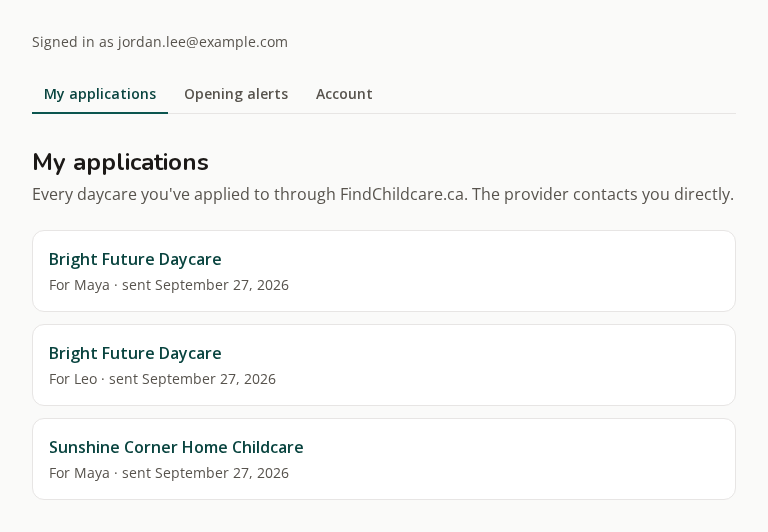
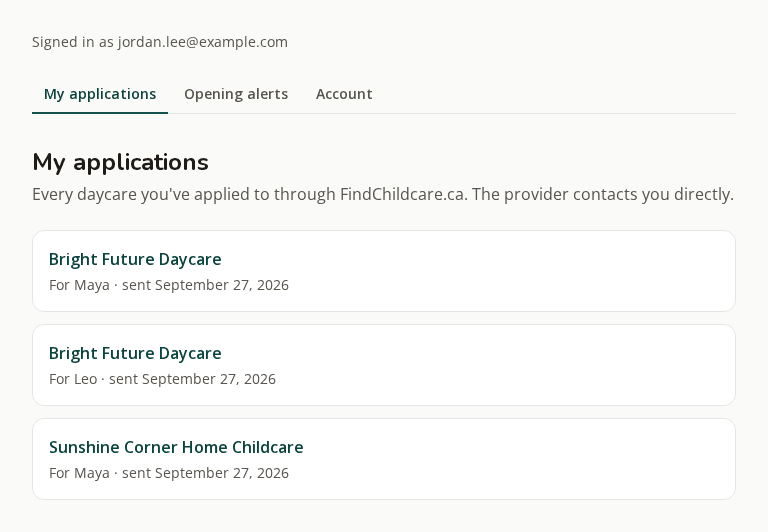
The link in that email opens My applications: each daycare you've applied to, which child it was for, and the date you sent it. Tap a daycare's name to go back to its listing and check its hours, fees or open spots.
It collects every application sent from the same email address, including the ones you sent before this page existed.
How signing in works
You sign in by email. Open the link, press Continue, and you're in for 30 days on that device.
- The link in an application email works for 30 days.
- Lost it? Go to the sign-in page, enter the email you applied with, and we'll send a fresh link that works for 24 hours.
- Nothing arriving? Check your spam folder and add [email protected] to your contacts.
Your opening alerts live here too
If you get our Saturday email of open daycare spots, its settings have moved in beside your applications. The same sign-in reaches both, so changing your cities, type of care or languages is one tab over from the list of daycares you've applied to. You can also switch the Saturday email on from there if you haven't yet.
Keeping it yours
The Account tab has two controls worth knowing about.
- Sign out everywhere ends every session and stops every sign-in link we've already emailed you. Use it if you forwarded one of our emails, or signed in on a shared computer.
- Delete your account removes it and stops our emails. The applications you sent stay with those daycares, the same as if you'd emailed them yourself.