
See what's live at a glance
Sep 23, 2026
Every listing in your dashboard now carries its state: Published, Unpublished or Archived. An unpublished listing is invisible to families, so it says so on the card, with a link straight to the form to finish it. Any listing sitting unpublished is also named at the top of your dashboard.

Publishing stays a step you take yourself, and now you can see at a glance which listings have had it.
What the three states mean
- Published — in search, on the city and province pages, and eligible for the Saturday openings email.
- Unpublished — complete or not, families cannot see it. This is where a listing sits after you create it.
- Archived — a listing you have retired. It stays in your dashboard for reference and nothing nags you about it.
If you have ever filled in a listing, come back a week later and wondered why no families had found it, this is usually the answer.
A warning before you list twice
The listing form now checks whether you already list that daycare.
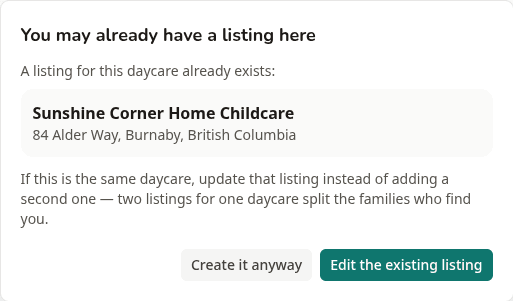
If you are about to add a listing at an address you already list, it says so before anything is created, names the listing you have, and offers to take you there instead. Adding a second site — another location, or a centre alongside a home daycare — works as it always has: carry on, and the warning steps out of the way.
Two listings for one daycare split the families who find you. Some land on one, some on the other, and the one you are not keeping current is the one handing out your old phone number. It happens most often when a listing created before you had an account is still sitting there under the same email address.
If you already have two, sorting it out takes about five minutes. The one decision worth making carefully is which of the two to keep, because the listing with your best information is not always the one families can see.
Where to look
Open your dashboard. The state sits beside each listing name, and anything unpublished carries a Finish publishing link that drops you into the right form. Set the visibility at the top of that form to Published, save, and families can find you from that moment.
Worth a look even if you are sure everything is live — a listing you started on a phone and meant to come back to will be sitting there, finished and invisible.